
Bank statement to Excel in Singapore
Statemently converts Singapore bank statements into checked spreadsheet rows. It reads dates printed as day-month-year (DD/MM/YYYY or 05 Jan 2026) and dollar (SGD) amounts written like 1,234.56, then checks every row against the statement's printed balances.
- No account needed to start
- Free preview of your results
- Checked against printed balances
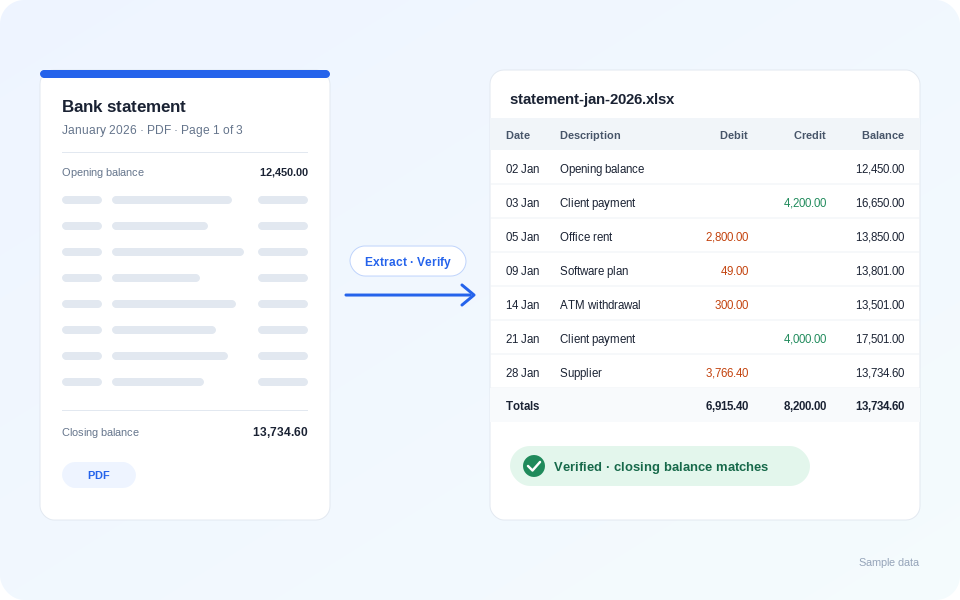
What Statemently does here
Singapore statements often hold several currencies in one account; Statemently keeps each currency in its own totals.
Exports: Excel, CSV, JSON, Xero and QuickBooks. Accounting files are import-compatible, not official integrations.
Works with statements from DBS Bank, OCBC, UOB and Standard Chartered Singapore and other Singapore banks; upload one statement to see its status before converting more.
Bank statements from Singapore
Pages for 9 banks, cards and wallets in Singapore. Each explains how that statement converts and what to check.
A clean, checked export
One row per transaction, with debit, credit and running balance in their own columns, and a status for the whole statement. The example below uses sample data.
| Date | Description | Category | Debit | Credit | Balance |
|---|---|---|---|---|---|
| 02 Jan | Opening balance | 12,450.00 | |||
| 03 Jan | Client payment INV-1042 | Income | 4,200.00 | 16,650.00 | |
| 05 Jan | Office rent | Rent | 2,800.00 | 13,850.00 | |
| 09 Jan | Card: software plan | Software | 49.00 | 13,801.00 | |
| 14 Jan | ATM withdrawal | Cash | 300.00 | 13,501.00 | |
| 21 Jan | Client payment INV-1047 | Income | 4,000.00 | 17,501.00 | |
| 28 Jan | Supplier: packaging | Supplies | 3,766.40 | 13,734.60 | |
| Totals | 6,915.40 | 8,200.00 | 13,734.60 | ||
Know the numbers are right before you use them
Opening balance, plus money in, minus money out, must equal the closing balance printed on the statement, and every running balance must follow from the one before. If anything does not add up, you see it.
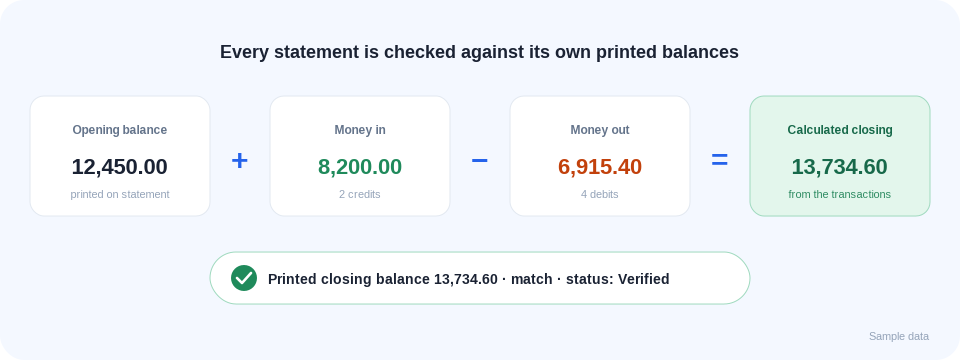
The transactions reconcile with the printed balances and no row needs review.
A check could not be completed, or a row needs a look. You get a list of exactly which.
The printed closing balance contradicts the transactions, so a row is missing or misread.
See the workspace on sample data
Switch the sample, pick a month and open a transaction. It works like the real workspace.
₹84,200 + ₹74,000 − ₹37,520 = ₹1,20,680
One statement, every format you need
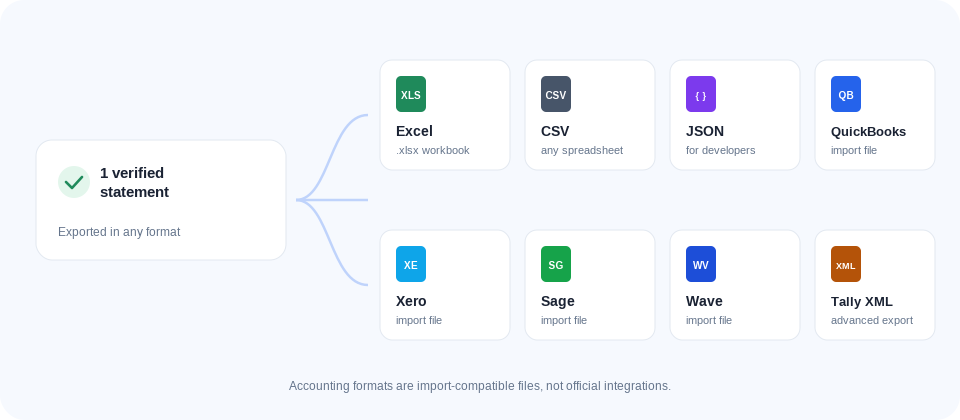
Excel, CSV and JSON are on every plan. Import-compatible files for QuickBooks, Xero, Sage and Wave come with Accounting Pro, and Tally XML and ledger formats with the advanced exports.
From statement to clean data in four steps
- 01
Upload
PDF, scan, phone photo, CSV or XLSX, up to 20 MB. No account needed.
- 02
Extract
Transactions are read into rows, with OCR for scanned pages.
- 03
Verify
The rows are checked against the statement's printed balances.
- 04
Export
Download Excel, CSV, JSON or an accounting import file.
Preview free, subscribe to unlock everything
Every plan includes verification against the statement's printed balances. Cancel anytime.
Professional
Best fit- 100 statements / month
- Up to 100 pages per statement
- OCR for scanned statements & images
Accounting Pro
- 500 statements / month
- Up to 200 pages per statement
- OCR for scanned statements & images
Built for financial documents
Numbers from code, not AI
Totals, balances and verification are calculated by deterministic code. AI only helps read hard scans and phrase answers.
Passwords stay in memory
The password for an encrypted PDF opens the file for that conversion and is never stored.
No bank login, ever
You upload a statement file. Statemently never asks for your online banking credentials.
Frequently asked questions
Which Singapore banks does Statemently support?
Statemently reads statements by their structure and balances, so it is not limited to a list. Upload one statement from your bank: the status shows whether it verified, needs review or failed.
Are SGD totals kept separate from other currencies?
Yes. The currency is detected per statement, and totals and comparisons never add different currencies together.
Which accounting software can I import into?
Statemently exports import-compatible files for Xero and QuickBooks, plus Excel, CSV and JSON for anything else. Test one import before a large batch.
Turn your next statement into checked data
Upload a statement and preview its transactions, charts and verification status in seconds.